Dell’s Cheap Inspiron 11 3000 Hybrid Doesn’t Sacrifice Quality For Price
· By Zack Duncan · Laptop Rentals
Updated August 19, 2014
 When Lenovo announced its 2-in-1 Yoga hybrid series of laptops, it got people talking, but the above average prices didn’t really get too many people buying. Users were waiting for something that offered essentially the same thing the Yoga series did but at a price that didn’t make them feel like they were making a ritualistic sacrifice of their wallets…. and that’s exactly what Dell has come up with.
Dell’s new Inspiron 11 3000 is basically a stripped down version of the company’s $1,200 XPS 11, leaving in only the essential technologies with a $500 price tag. In addition to that, Dell also managed to keep the 360-degree hinges for the device’s laptop-to-tablet design.
The 11 3000 has entry-level components on the inside that vary depending on location. In the US Dell has two different configurations. One has a dual-core Celeron N2830 while the other has a quad-core Pentium N3530. These replace the Intel Atom processors that are typically found in this type of ultraportable. This change is actually a really good one as it delivers more performance with improved power efficiency.
$50 separates the market value prices, with the Celeron running $450 and the Pentium running $500. These prices have been known to change, however, as both models have been found priced at $400 and $480, respectively, with slightly varying specs. The specs that do remain constant, however, include 4GB of memory, integrated Intel HD graphics and a 500GB 5,400rpm hard drive.
Unfortunately for you readers in the UK the 11 3000 is currently unavailable on Dell’s UK site, though you can pick one up from the Australian site for AU$599. What’s interesting is that the Australian model comes with dual-band 802.11ac WiFi, a model that isn’t available in the US version.
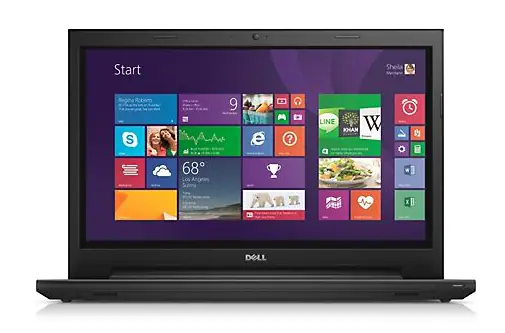
Despite the price, the 11 3000 is a nice looking hybrid. The body is made of plastic instead of aluminum, though from afar one could confuse the two. In addition to that, the body feels solid, though the hinge design does make the design slightly thicker. The overall thickness of the 11 3000 is still under an inch thick, 11.8 inches wide and 7.9 inches deep.
When opened, the 11 3000 looks like a typical clamshell laptop. The 1,366 x 768 IPS touchscreen allows for wide viewing angles. Below the screen is a Windows logo key that can be set to go to the Start menu or the desktop. The keyboard leaves a decent amount of room below it for resting your palms on with the touchpad wide enough for easy access and use. In addition to that, the keys are also just big enough with no small, awkward keys, making typing easy and comfortable.
Laptop Rentals Are Easy And Surprisingly Affordable, Contact www.RentOurLaptops Today At 888-736-8301
Since the device doubles as a tablet, the power button and volume button are located on the right side of the 11 3000. Also located on the right side is a USB 2.0 port, SD card reader and security slot. The left side houses the headphone/microphone jack, an additional USB 2.0 port as well as a USB 3.0 port with sleep charging. There’s also a full-size HDMI output along with the power outlet. Wireless options include Bluetooth 4.0 and 2.4GHz 802.11n WiFi with a single antenna instead of the newer 802.11ac and instead of dual-band.
Overall, the Dell Inspiron 11 3000 may not be the beefiest hybrid on the market, but if you are looking for something that doesn’t need to have to do too much more than basic home office or student work then this is a great option, especially for the price. The versatility is a great thing to have and you can even upgrade the memory or storage yourself. That coupled with a long battery life makes the perfect combination.